
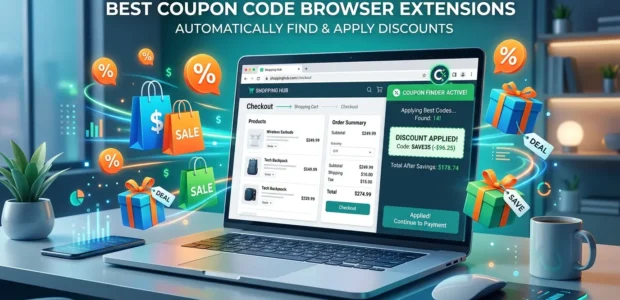

Saving money while shopping online has never been easier. Today, you don’t have to spend time searching for coupon codes before you buy something. A good coupon browser extension can do the work for you
These free tools check for available coupon codes, test them at checkout, and apply the one that gives you the biggest discount. Some extensions also help you earn cashback, compare prices, and alert you when prices drop.
At The Discount Empire, our team checks thousands of coupon codes every month. During our research, we found that browser extensions are great for saving time, but they don’t always find every working coupon. That is why many smart shoppers use both a browser extension and trusted coupon websites together.
In this guide, you’ll learn:
- What coupon browser extensions are
- How they work
- Why do they help you save money
- Which features matter before you install one
- The best browser extensions to use in 2026
If you’re new to online coupons, we also recommend reading our How to Use Coupon Codes guide. It explains how coupon codes work and how to use them correctly. If you want to save even more, don’t miss our Coupon Stacking Tips to learn when you can combine multiple discounts.
Table of Contents
What Is a Coupon Code Browser Extension?
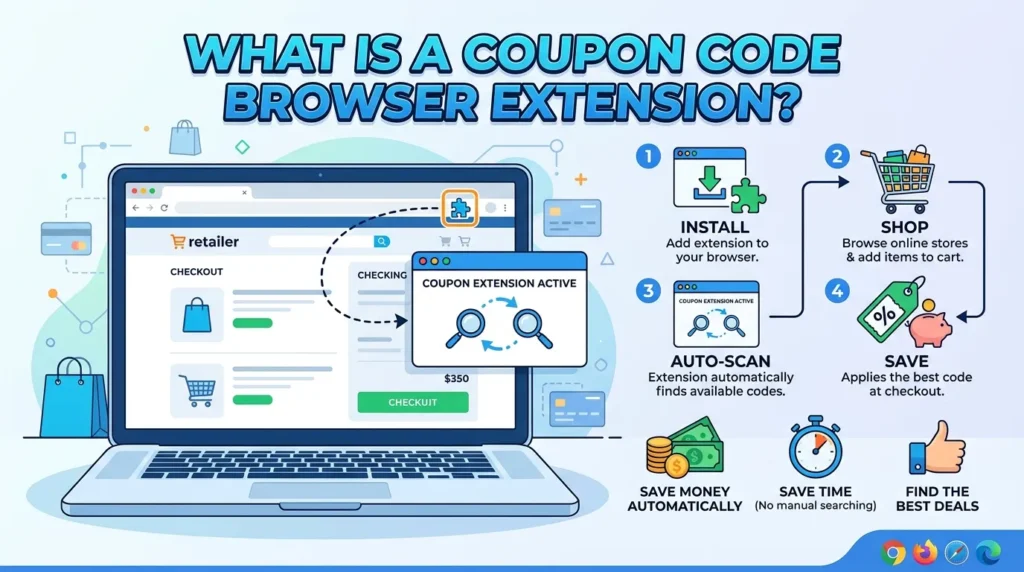
A coupon code browser extension is a small free tool that you add to your web browser, such as Google Chrome, Microsoft Edge, Firefox, or Safari.
After you install it, the extension works quietly in the background while you shop online.
When you reach the checkout page, it automatically:
- Searches for available coupon codes
- Tests different promo codes
- Applies the best working code
- Shows how much money you saved
This means you don’t have to open several websites or copy and paste coupon codes yourself.
Most browser extensions only take a few seconds to test available discounts.
How Do Coupon Browser Extensions Work?
The process is very simple.
Step 1: You Shop Normally
Visit your favorite online store and add products to your shopping cart.
Step 2: Go to Checkout
When you open the checkout page, the extension recognizes the store.
Step 3: It Searches for Coupon Codes
The extension checks its coupon database to find available promo codes for that store.
Step 4: It Tests the Codes
Instead of making you try each coupon one by one, the extension automatically tests several codes.
Step 5: It Applies the Best One
If a working coupon is found, the extension applies it and updates your total price.
The whole process usually takes less than 15 seconds.
Why Do Browser Extensions Save So Much Time?
Without a browser extension, saving money usually looks like this:
- Search Google for coupon codes
- Visit different coupon websites
- Copy the code
- Paste it at checkout
- Repeat if it doesn’t work
This can take several minutes, and many codes may already be expired.
A browser extension removes most of this work. It searches and tests coupon codes automatically while you continue shopping.
Instead of wasting time, you can focus on finding the products you want.
More Than Just Coupon Codes
Many people think these extensions only apply coupons, but most of them offer extra money-saving features.
Some browser extensions can also:
- Compare prices from different stores
- Track price drops
- Show price history
- Offer cashback rewards
- Alert you when an item goes on sale
These extra features can help you save even more throughout the year.
If you often shop online, using one of these tools can make a big difference.
Do Browser Extensions Find Every Coupon?
No.
This is something many shoppers don’t know.
Browser extensions can only use the coupon codes that are stored in their own database. If a new coupon has just been released or a store shares an exclusive code with a trusted coupon website, the extension may not find it.
That is why we recommend checking The Discount Empire before you complete your purchase.
Our team regularly verifies new coupon codes, limited-time offers, and exclusive deals that may not appear in browser extensions right away.
Using both methods gives you a better chance of finding the biggest discount.
You can also check our guide on Free Shipping Codes because free shipping offers are sometimes separate from discount coupons and may not be applied automatically.
Are Coupon Browser Extensions Safe?
Most well-known browser extensions are safe to use when downloaded from official browser stores.
However, you should always:
- Install trusted extensions with good reviews.
- Read the permissions before installing.
- Keep your browser updated.
- Remove extensions that you no longer use.
Well-known coupon extensions are used by millions of shoppers worldwide and are regularly updated to improve security and performance.
What You’ll Learn Next
Now that you know how coupon browser extensions work, it’s time to compare the best options available in 2026.
In the next section, we’ll review the top browser extensions, explain their biggest strengths, discuss their drawbacks, and help you choose the right one for your shopping style.
We’ll also compare popular tools like Honey and Capital One Shopping so you can decide which one offers the best value.
If you’re wondering whether cashback or coupon codes save more money, be sure to read our guide on Cashback vs Coupon Codes after finishing this article.
Best Coupon Code Browser Extensions in 2026
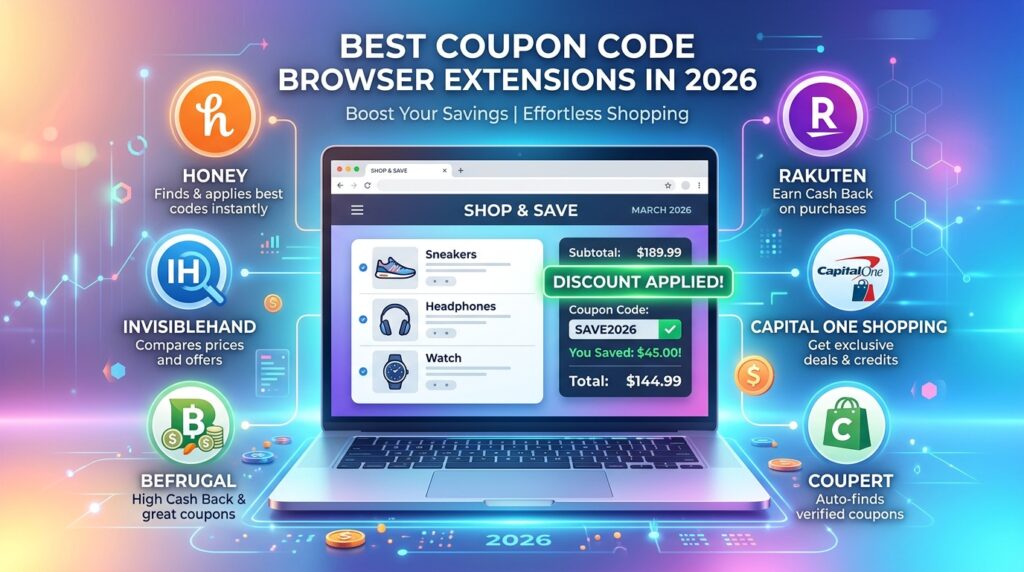
There are many coupon browser extensions available today, but not all of them work the same way. Some are better at finding coupon codes, while others focus more on cashback or price tracking.
Our team at The Discount Empire reviewed popular browser extensions by looking at their features, ease of use, customer reviews, update history, and overall shopping experience.
Here are the best coupon code browser extensions to use in 2026.
1. Honey – Best for Finding Coupon Codes
Honey is one of the most popular coupon browser extensions in the world. It is free to use and works with thousands of online stores.
When you reach the checkout page, Honey automatically searches for available coupon codes and tests them for you. If it finds a working code, it applies the one that gives you the biggest discount.
Honey also offers a rewards program where you can earn points on selected purchases and redeem them for gift cards.
What We Like
- Easy to install and use
- Automatically tests coupon codes
- Works with many popular online stores
- Tracks price history on selected products
- Available for Chrome, Edge, Firefox, and Safari
Things to Know
- It may not find every coupon code.
- Some smaller stores are not included.
- Rewards are available only at participating retailers.
Best For
People who want an easy way to find coupon codes without doing any extra work.
2. Capital One Shopping – Best for Price Comparison
Capital One Shopping is another excellent browser extension for online shoppers.
It automatically searches for coupon codes at checkout, but it also compares prices from different stores. This helps you see if the same product is available somewhere else for less money.
If the price drops later, the extension can also send you a notification.
What We Like
- Finds and applies coupon codes automatically
- Compares prices across different stores
- Sends price drop alerts
- Easy and free to install
- Clean and simple interface
Things to Know
- Price comparisons work best for popular products.
- Rewards are available only through participating stores.
- Some smaller retailers may not be supported.
Best For
Shoppers who want to save money by finding both the best coupon code and the best product price.
Honey vs Capital One Shopping
Many people ask which extension is better.
The answer depends on how you shop.
Honey is a great choice if your main goal is finding coupon codes quickly.
Capital One Shopping is better if you also want to compare prices before buying.
Many experienced online shoppers install both because they work well together and increase the chances of saving money.
3. Coupert – Best for Coupons and Cashback Together
Coupert is becoming more popular every year because it combines coupon codes with cashback rewards.
Like other extensions, it automatically searches for working coupon codes during checkout. If cashback is available, Coupert will also remind you to activate it.
This makes it a good option for people who shop online often.
What We Like
- Automatically applies coupon codes
- Offers cashback at many online stores
- Simple and clean design
- Fast checkout experience
- Easy for beginners to use
Things to Know
- Cashback offers change from one store to another.
- It may have fewer coupon codes than larger extensions.
- Some rewards may take time to become available.
Best For
Regular online shoppers who want both coupon savings and cashback rewards.
Which One Should You Choose?
Each browser extension has its own strengths.
Choose Honey if:
- You mainly want automatic coupon codes.
- You shop at many different online stores.
- You want a simple setup.
Choose Capital One Shopping if:
- You like comparing prices before buying.
- You want price drop alerts.
- You shop for electronics, home products, or everyday items.
Choose Coupert if:
- You want coupons and cashback in one extension.
- You shop online several times each month.
- You want another way to earn extra savings.
Remember, no browser extension can find every coupon code.
Before placing a large order, it’s always a smart idea to check The Discount Empire for the latest verified coupons. Sometimes you’ll find exclusive deals that browser extensions haven’t added yet.
If your order qualifies for free delivery, don’t forget to check our Free Shipping Codes page. Free shipping can often save just as much as a discount coupon.
You can also combine these savings with the methods explained in our Coupon Stacking Tips guide whenever a store allows multiple promotions.
4. Rakuten – Best for Cashback Rewards
Rakuten is one of the best browser extensions if your main goal is earning cashback while shopping online.
When you visit a partner store, Rakuten reminds you to activate cashback before you complete your purchase. It also checks for available coupon codes to help you save even more.
Although its coupon database is smaller than some other extensions, Rakuten is trusted by millions of shoppers because of its strong cashback program.
What We Like
- High cashback rates at many popular stores
- Easy cashback activation
- Also checks for available coupon codes
- Simple and beginner-friendly
- Works with major web browsers
Things to Know
- You need a free account to earn cashback.
- Cashback is not available at every store.
- Coupon coverage is smaller than Honey.
Best For
People who shop online often want to earn cashback on their purchases.
5. BeFrugal – Good for Extra Savings
BeFrugal is another helpful browser extension that combines coupon codes with cashback offers.
It works with many online stores and automatically checks for available discounts during checkout. Some cashback rewards are paid faster than on other platforms, which many users like.
While it may not be as popular as Honey or Rakuten, it is still a good option for people who want another way to save money.
What We Like
- Finds coupon codes automatically
- Offers cashback at many stores
- Easy to install
- Multiple payment options for rewards
- Free to use
Things to Know
- Works best for shoppers in the United States.
- Some smaller stores may not be supported.
- Cashback offers change regularly.
Best For
Shoppers who want another cashback option along with automatic coupon codes.
6. InvisibleHand – Best for Price Alerts
InvisibleHand is different from most browser extensions in this list.
Instead of testing coupon codes, it focuses on finding lower prices. While you shop, it checks whether the same product is available somewhere else for less money.
It also works with some travel websites, making it useful for finding better prices on flights and hotels.
What We Like
- Alerts you when a lower price is available
- Very light and fast
- Easy to use
- Doesn’t interrupt your shopping
- Supports shopping and travel websites
Things to Know
- It does not automatically apply coupon codes.
- No cashback program.
- Covers fewer stores than some larger extensions.
Best For
People who want to compare prices before buying rather than search for coupon codes.
Easy Comparison Table
| Feature | Honey | Capital One Shopping | Coupert | Rakuten | BeFrugal | InvisibleHand |
| Auto Applies Coupon Codes | ✅ | ✅ | ✅ | ✅ | ✅ | ❌ |
| Cashback Rewards | ✅ | ✅ | ✅ | ✅ Excellent | ✅ | ❌ |
| Price Comparison | ❌ | ✅ | ❌ | ❌ | ❌ | ✅ |
| Easy for Beginners | ⭐⭐⭐⭐⭐ | ⭐⭐⭐⭐⭐ | ⭐⭐⭐⭐☆ | ⭐⭐⭐⭐⭐ | ⭐⭐⭐⭐☆ | ⭐⭐⭐⭐☆ |
| Best For | Coupon Codes | Price Comparison | Coupons + Cashback | Cashback | Extra Savings | Price Alerts |
Which Browser Extension Is Best?
There isn’t one extension that is perfect for everyone.
The best choice depends on how you shop.
Choose Honey if you:
- Want the easiest way to apply coupon codes.
- Shop at many different online stores.
- Prefer a simple setup.
Choose Capital One Shopping if you:
- Want to compare prices before buying.
- Like receiving price alerts.
- Shop for expensive products.
Choose Coupert if you:
- Want both coupon codes and cashback.
- Shop online every week.
- Like earning extra rewards.
Choose Rakuten if you:
- Care more about cashback than coupon codes.
- Shop at popular online stores.
- Want long-term savings.
Choose BeFrugal if you:
- Want another cashback option.
- Like trying different saving tools.
- Shop mostly from US retailers.
Choose InvisibleHand if you:
- Want to find lower prices.
- Shop for travel deals.
- Don’t mind entering coupon codes yourself.
Our Recommendation
After testing different browser extensions, we believe many shoppers will get the best results by using more than one tool.
For example:
- Use Honey to find working coupon codes.
- Use Rakuten to earn cashback.
- Check The Discount Empire before you pay to look for the newest verified coupon codes.
This simple habit can help you save more than using just one browser extension.
If a store allows multiple discounts, our Coupon Stacking Tips guide explains how to combine offers the right way.
You should also compare your total savings with cashback offers. Our Cashback vs Coupon Codes guide can help you decide which option gives you the biggest discount for each purchase.
Get the Best Savings: Use Browser Extensions and The Discount Empire Together
A browser extension is a great way to save money, but it should not be the only tool you use.
Most browser extensions search their own coupon database. This means they can miss:
- New coupon codes
- Store-exclusive offers
- Limited-time promotions
- Special holiday discounts
- Coupons are added only to trusted coupon websites
That is why many experienced shoppers use both a browser extension and The Discount Empire.
Our team regularly checks and updates coupon codes to help shoppers find offers that still work. We also remove expired deals whenever possible, so you spend less time testing codes.
A Simple Money-Saving Routine
Before you buy anything online, follow these easy steps:
- Visit The Discount Empire and search for your store.
- Copy any verified coupon codes you find.
- Add your products to the shopping cart.
- Let your browser extension test available coupon codes.
- If needed, try the verified code from The Discount Empire.
- Activate cashback if your extension offers it.
- Complete your purchase and enjoy the savings.
This process usually takes only a few extra minutes but can help you save much more on large orders.
Are Coupon Browser Extensions Safe?
Yes, most popular browser extensions are safe when you download them from the official browser store.
However, it is still important to be careful.
Before installing any extension, check:
- The number of downloads
- Recent user reviews
- The date of the latest update
- The permissions it asks for
If an extension asks for access that does not seem related to shopping, take a closer look before installing it.
Downloading extensions only from trusted sources helps protect your personal information.
What Information Can Browser Extensions See?
Many people wonder if browser extensions can see their shopping activity.
The answer is yes but only to the extent needed for the extension to work.
For example, a coupon extension may see:
- The shopping website you are visiting
- The items in your cart
- The checkout page
- The total price before and after discounts
This information helps the extension test coupon codes and activate cashback.
Always read the privacy policy to understand how your data is used.
Do Browser Extensions Always Find the Best Coupon?
No. Even the best browser extensions cannot find every working coupon.
There are several reasons for this.
1. New Coupons
Some coupon codes are released only a few hours before you shop. It can take time for browser extensions to add them to their database.
2. Exclusive Coupon Codes
Some stores share special coupon codes only with selected partners.
If the extension does not have access to those codes, it cannot apply them.
3. Member-Only Offers
Some discounts are available only to loyalty program members or email subscribers.
These personal coupons cannot usually be found by browser extensions.
4. Store Rules
Some online stores allow only one coupon code per order.
The extension may apply one working code even though another code could save you more.
This is why it is always worth checking The Discount Empire before placing a large order.

Common Mistakes That Stop People From Saving Money
Many shoppers miss easy savings because of small mistakes.
Here are a few things to avoid.
Only Using One Tool
No browser extension has every coupon code.
Using both a browser extension and a trusted coupon website gives you better results.
Ignoring Cashback
Sometimes cashback saves more money than a coupon code.
Before paying, compare both options. Our guide on Cashback vs Coupon Codes explains when each option is the better choice.
Forgetting Free Shipping
Many shoppers focus only on discount codes and forget about shipping costs.
A free shipping offer can sometimes save more than a small percentage discount.
Before you check out, check our latest Free Shipping Codes to see if your order qualifies.
Not Reading Store Terms
Some coupon codes work only on selected products or require a minimum order value.
Reading the terms can save you time and help you choose the best discount.
How We Review Coupon Browser Extensions
At The Discount Empire, we don’t recommend tools simply because they are popular.
Our reviews are based on several important factors, including:
- Ease of use
- Coupon success rate
- Cashback features
- Browser compatibility
- User experience
- Update frequency
- Overall value for shoppers
We also monitor changes throughout the year so our recommendations stay up to date.
Because browser extensions change over time, we review this guide regularly to keep the information as accurate as possible.
Which Browser Extension Should You Install in 2026?
If you only want automatic coupon codes, Honey is still one of the easiest choices.
If you also want price comparisons, Capital One Shopping is a strong option.
If cashback is your main goal, Rakuten is one of the best choices.
Many online shoppers install two extensions because they offer different benefits.
No matter which one you choose, checking The Discount Empire before completing your purchase can help you find extra coupon codes that browser extensions may miss.
If you want to learn how to combine multiple offers when stores allow it, read our Coupon Stacking Tips guide. It explains simple ways to maximize your savings without breaking store rules.
Final Thoughts
Coupon browser extensions make online shopping easier and help you save money without much effort. Once you install one, it can automatically look for coupon codes, apply the best available discount, and even activate cashback at supported stores.
However, no browser extension can find every working coupon.
The best way to save more is to use a browser extension together with The Discount Empire. While the extension searches its own database, our team regularly updates verified coupon codes, limited-time offers, and exclusive deals that may not appear in browser extensions right away.
If you shop online often, this simple habit can help you save money throughout the year.
To get the best results:
- Install a trusted coupon browser extension.
- Check The Discount Empire before you buy.
- Compare cashback offers when available.
- Look for Free Shipping Codes to reduce delivery costs.
- Read our Coupon Stacking Tips to learn when multiple discounts can be used together.
- Understand the difference between rewards by reading Cashback vs Coupon Codes.
Using these tools together gives you a better chance of finding the biggest savings on every order.
FAQs
1. What is the best coupon code browser extension in 2026?
There is no single extension that is perfect for everyone. Honey is a popular choice for finding coupon codes automatically, while Rakuten is known for cashback rewards. Capital One Shopping is also a good option if you want price comparisons.
2. Are coupon browser extensions free?
Yes. Most trusted coupon browser extensions are completely free to install and use. You can download them from the official browser store without paying a subscription fee.
3. Do browser extensions really save money?
Yes. They can automatically test coupon codes, activate cashback, and sometimes help you find lower prices. Your total savings depend on the store, the available offers, and your purchase amount.
4. Why doesn’t my browser extension find every coupon?
Browser extensions only search the coupon codes in their own database. They may miss new, exclusive, or limited-time offers. That is why checking The Discount Empire before you buy can help you find extra savings.
5. Is it safe to use coupon browser extensions?
Most well-known browser extensions are safe when downloaded from official browser stores. Always read user reviews, check permissions, and keep your browser updated for the best security.
6. Can I use more than one coupon browser extension?
Yes. Many shoppers install more than one extension because each one offers different features. One extension may find a better coupon, while another may offer higher cashback.
7. Can I use coupon codes and cashback together?
Often, yes. Many stores allow you to apply a coupon code and earn cashback on the same purchase. Store policies can be different, so always check the terms. You can learn more in our Cashback vs Coupon Codes guide.
8. Do coupon browser extensions work on every online store?
No. Each extension supports a different list of retailers. Large online stores are usually supported, but smaller or new stores may not be included.
9. Can browser extensions find free shipping offers?
Sometimes they can, but not always. Many stores publish separate shipping promotions that may not appear in extension databases. Checking our Free Shipping Codes page can help you find additional delivery savings.
10. What is the smartest way to save money when shopping online?
The best strategy is to combine different saving methods. Use a trusted browser extension, check The Discount Empire for verified coupon codes, compare cashback offers, and follow our Coupon Stacking Tips whenever a store allows multiple discounts.
Keep Saving with The Discount Empire
Looking for more ways to spend less on your online shopping?
Explore these helpful guides:
- How to Use Coupon Codes – Learn how coupon codes work and how to use them correctly.
- Coupon Stacking Tips – Discover when you can combine multiple offers for bigger savings.
- Free Shipping Codes – Find the latest shipping offers to reduce delivery costs.
- Cashback vs Coupon Codes – Compare both methods and learn which one helps you save more.
Our team updates deals and shopping guides throughout the year to help you find verified discounts and make smarter buying decisions.
Whether you’re shopping for clothing, electronics, travel, beauty products, or home essentials, we’re here to help you save money every time you shop online.
Pingback:How to Find Verified Coupon Codes Before Checkout